Alright, let’s get one thing straight: if traditional programming languages are like building a car from scratch, then scripting languages are like being handed the keys and told, “Get us there fast.” This past paper isn’t about rigid structure—it’s about speed, flexibility, and getting things done with minimal friction. It’s the difference between constructing a cathedral and quickly assembling a sturdy, functional shelter.
Forget lengthy compile cycles and heavyweight IDEs. This is the world where a few lines of code can automate a day’s work, scrape the web, parse gigabytes of logs, or glue together mismatched systems. It’s programming with a sense of urgency and pragmatism.
What This Paper Actually Cares About:
1. The Mindset: Why Script?
The opening questions often set the tone: they ask you to justify the choice. Why use Python for a system admin task instead of C? Why would JavaScript be a good fit for a quick API test?
This tests whether you understand scripting’s core strengths:
- Rapid Development: Write-test-debug cycles measured in seconds, not minutes.
- High-Level Abstraction: Powerful built-in data types and functions that handle the grunt work.
- Glue Logic: The famous “duct tape” of computing—connecting programs that weren’t designed to talk.
2. The Workhorses: Data Wrangling & Text Manipulation
If scripting has a superpower, it’s turning messy data into something useful. Brace yourself for:
- String Operations & Regular Expressions: You won’t just write regex—you’ll live in it. Extracting dates from logs, validating emails, replacing patterns across files. It’s textual archaeology.
- File I/O Mastery: Reading directories, filtering files by extension/date, parsing CSVs/JSONs, writing reports. Expect a question like: “Write a script to find duplicate files in a folder tree based on MD5 hash.”
- Data Structure Fluency: Lists, dictionaries (hashes), sets—and their expressive methods. You’ll be asked to transform data elegantly: “Convert this list of tuples into a dictionary grouped by key.”
3. Automation & System Interaction
This is where you prove you can make the machine work for you:
- Shell Integration: Bash/PowerShell commands embedded in scripts. Piping, redirection, exit code handling.
- Task Automation: Bulk renaming, scheduled backups, monitoring disk space, launching processes.
- Practical Scenarios: “Write a script that deploys a website: pull Git, install dependencies, restart the server.” It’s not theoretical—it’s what DevOps is built on.
4. The Modern Scripting Landscape
Scripting isn’t just local anymore. The paper likely touches:
- Web & API Scripting: Using Python’s
requestsor Node.js to consume REST APIs, handle authentication, process JSON responses. - Lightweight Web Serving: Building a simple HTTP server in a dozen lines (Python’s
http.server, Node’sExpress). - Cross-Platform Considerations: Making your script work on Windows, Linux, and macOS—handling path differences, line endings, and platform-specific commands.
5. The Quirks & The Power
Scripting languages have personality—and the paper tests if you know their traits:
- Dynamic Typing: A blessing (flexibility) and a curse (runtime errors). You’ll debug code where a variable changes type unexpectedly.
- Functional Flavors: Map, filter, reduce, lambda functions. You’ll rewrite a loop into a one-liner.
- Prototypal Inheritance (JavaScript), Everything-is-an-object (Python), The $_ variable (Perl): Each language has its idioms, and you need to speak them.
The Real Challenge of This Paper: Density & Interpretation
Scripting code is often dense. A single line of Perl can look like alphabet soup. A Python list comprehension can replace five lines. The exam tests your ability to:
- Read and mentally execute tight, idiomatic code.
- Write concise solutions that are clever but still readable.
- Explain your reasoning clearly—because with great power (and conciseness) comes great responsibility for clarity.
How to Use This Past Paper to Actually Level Up:
- Adopt the “Lazy Programmer” Ethos.
Your goal is to do more with less. For every problem, ask: “Can I solve this in fewer lines? Is there a built-in function or module that does this?” - Become a Regex Black Belt.
Seriously. Regular expressions are a language within a language. Practice until you can write patterns for phone numbers, URLs, and log timestamps in your sleep. - Practice “Scripting on Paper.”
Write pseudocode and real syntax by hand. You won’t have autocomplete in the exam. Muscle memory for colons, indentation, and bracket placement matters. - Think in Pipelines.
See tasks as a sequence of transformations: input → filter → transform → output. This pipeline mindset is at the heart of shell scripting and functional-style code. - Comment for Intent, Not Redundancy.
When you write a clever one-liner, add a comment explaining what it achieves in the bigger picture, not how each character works. Show you understand the strategy, not just the syntax.
This past paper is your test in computational efficiency and practical ingenuity. It rewards those who can look at a tedious, repetitive task and say, “Wait, I can make the computer do that.” Passing it means you’re not just a coder—you’re a digital problem-solver who can bend technology to your will with elegant, effective, and often beautifully brief scripts.
Scripting languages all previous/ past question papers
Q1:
Write a python script which accepts a sequence of comma-separated numbers from console and generate a list and a tuple which contains every number. Suppose the following input is supplied to the program: 34,67,55,33,12,98. Then, the output should be: [‘34’,’67’,’55’,’33’,’12’,’98’](‘34’,’67’,’55’,’33’,’12’,’98’).
Q2:
Build a to-do app using Django project and python scripting. A to-do app is a software application that lets you make a list of tasks that you need to complete. You can make daily or weekly lists of tasks in a to-do app. Once you complete a task, you can mark it completed and updates your to-do list. It is a convenient app that lets you keep track of your chores. Also add a delete link to delete first task from the to-do list. Provide all the necessary files that you need to edit in Django project e.g urls, views, templates files etc.
Q3:
Develop a simple “Is it Midterm week?” app for COMSATS University Islamabad using Django framework. The midterm exam as per academic calendar are conducted between November 15 and November 19, 2021. The app must calculate the desired dates using python scripting and show Yes/No accordingly. Also add a bit of CSS to reflect COMSATS theme in your page keeping in mind that COMSATS current logo is designed with blue and purplish colors. Provide all the necessary files that you need to edit in Django project e.g urls, views, templates files etc.
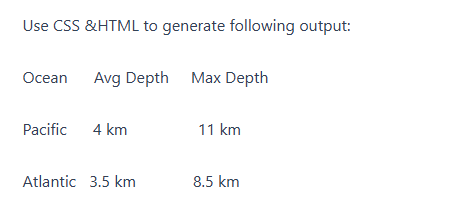
Use CSS &HTML to generate following output:
Ocean Avg Depth Max Depth
Pacific 4 km 11 km
Atlantic 3.5 km 8.5 km
Question 02:
Marks: 15
Develop a simple “Is it New year?” app using Django framework. The app must calculate the desired dates using python scripting and show Yes/No accordingly. Also add a bit of CSS to stylize your app. Provide all the necessary files that you need to edit in Django project e.g urls, views, templates files etc.
Question 03: Marks: 30
Design a to do list app which will keep on adding a dropdown list instead of listing in
unordered list