Let’s be clear: Visual Programming is not “easy mode” for coding. It’s a different language entirely—one where you speak in blocks, wires, and diagrams instead of words and symbols. This past paper tests whether you can think in systems and flows, designing solutions where the logic is literally laid out in front of you, visible and tangible.
Forget memorizing syntax errors. Here, a bent wire or a misaligned block is the bug. This subject turns abstract algorithms into something you can almost touch—and this exam asks you to build, debug, and justify those constructions.
What This Paper Is Really About: Spatial Logic and Flow Design
1. The Core Idea: Programming Without Text
The first questions often challenge your understanding of the paradigm shift:
- From Lines to Nodes: Instead of writing
if (x > 5), you drag a “Greater Than” block, connect a data wire tox, another to5, and run its output to a “Conditional” block. - The Visual Advantage: Immediate readability. You can see data moving, decisions branching, and loops unfolding. It’s logic as a flowchart that actually runs.
- Where It Shines (and Where It Doesn’t): You’ll need to argue when to use a visual tool (rapid prototyping, educational contexts, IoT workflows, artist-friendly interactivity) and when to stick to text (large-scale systems, complex algorithms, version control needs).
2. The Building Blocks of a Visual Language
Every visual programming environment has its vocabulary. You must know the parts of speech:
- Nodes/Blocks: Functions, sensors, variables, control structures—each with input and output ports.
- Wires/Connections: These carry data (numbers, text, arrays) and sometimes execution signals (what runs next). A wire’s color or style often tells you what it’s carrying.
- The Workspace/Canvas: Your “code editor.” Keeping it organized is part of the grade. Spaghetti wiring is the visual equivalent of messy, uncommented code.
3. Key Design Challenges: How to Think in Diagrams
The exam presents problems that test your architectural skill in this visual space.
- Data Flow vs. Control Flow: In some systems (like LabVIEW), wires define both. In others (like Scratch), control is managed by stacking blocks. You must design accordingly.
- State and Memory: How do you make a visual program “remember” something? Using variables, feedback loops, or shift registers—all represented visually.
- Event Handling: “When the green flag is clicked…” (Scratch) or “On Button Click…” (App Inventor). You’ll design responsive systems that react to user input, timers, or sensor data.
4. Practical Domains: Where Visual Programming Lives
The paper often grounds itself in real applications:
- Education & Creativity (Scratch, MIT App Inventor): Designing games, interactive stories, or simple mobile apps. Questions might ask you to design the logic for a character to navigate a maze or a quiz app to track scores.
- Engineering & Automation (LabVIEW, Node-RED): Building instrument control systems, data dashboards, or IoT workflows. You might diagram a temperature monitoring system that logs data and triggers a fan.
- Game Development (Unreal Engine Blueprints): Creating gameplay mechanics without writing C++. You could be asked to design the pickup logic for a health pack or a door that opens with a switch.
5. Debugging with Your Eyes
Debugging here is a visual detective game. You might be given a faulty diagram and asked:
- “Why does this loop run forever?” (A feedback wire is connected wrong.)
- “Why is the output always zero?” (A data type mismatch at a connection.)
- “Trace the value of
xas it moves through these five blocks.”
The Hidden Test: Clarity and Organization
A visually correct but messy solution can lose marks. You’re tested on:
- Readability: Straight wires, aligned blocks, logical grouping.
- Modularity: Using custom blocks or sub-diagrams to avoid huge, sprawling canvases.
- Documentation: Adding labels and comments directly on the canvas to explain complex sections.
How to Approach This Past Paper:
- Plan Before You Place. Sketch a rough flowchart on scrap paper. Where does data start? What transformations happen? Where does it end? Then build it.
- Become a Wire Tracer. Practice following data through a complex diagram with your finger. Anticipate what each block will do to the data before it arrives.
- Learn the Idioms of Your Tool. Each platform has best practices:
- In Scratch, broadcast messages are used for communication between sprites.
- In LabVIEW, error clusters should flow through all nodes.
- In Node-RED, messages flow asynchronously.
- Practice “Visual Pseudocode.” Describe a process in plain English, then translate it step-by-step into the visual language.
- Keep It Clean. Treat the workspace like a technical drawing. Neatness isn’t just aesthetic—it’s functional. It prevents errors and makes your logic understandable at a glance.
This past paper is your proof of visual computational literacy. It shows you can construct, analyze, and communicate logic in a language that is intuitive, immediate, and increasingly vital in a world of IoT, creative tech, and educational tools. Passing it means you don’t just think in code—you think in systems you can see.
Visual programming Mid Term in 2021
Q1: Here is design of simple calculate. Let suppose code using three variables.
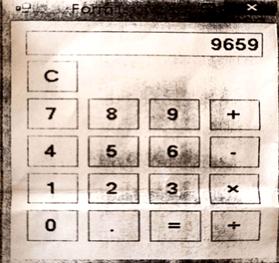
Float m; //first variable
Float n; //Second variable
Float total; //result variable
Write code behind the click event of following buttons:
+,-,x,% = and C
Q2: What is difference between Class and Object? Explain it with real life examples. Write the syntax of class and object in C#.
Q3: What is Control? Explain events and properties of a control?
Q4: Write a class to interact with SQL SERVER database. Class should have two functions: 1) Modification (to insert, delete and update data) and 2) Display Information (to get data).
Visual programming Sessional I in 2020
Question No. 1 Marks (04)
Write short answers of following:
a) Microsoft Intermediate Language (MSIL) and just-in-time (JIT) Compilation
b) What is difference in value type and reference type? Separately list-down (C# Primitive data type) into value type and reference type.
Question No. 2 Marks (03)
Describe at least two .NET Framework Exception classes and the error handling process of .NET Framework with C# code.
Question No. 3
Explain with C# code, defining an interface, implementing an interface and describe defining interface restrictions.
Visual programming Sessional II in 2 2020
Question No. 1
Write short answers of following:
a) Windows Forms Application vs Window Presentation Foundation (WPF). b) Describe Stream Class and its fundamental operations. List down five common
stream classes.
Question No. 2
XAML code for following GUI.
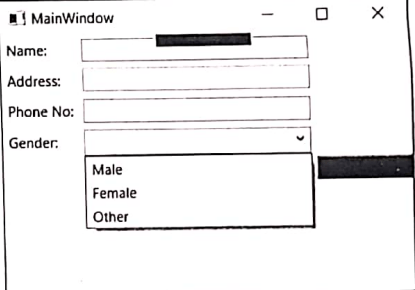
Question No. 3
You have access to a SQL server with the sample “pubs” databases installed and it contains an “Employee” table with fields (Emp_ID, Name, Address, Phone, Gender)
Using ADO.NET Provider, write complete C# function that return Employee table.
Visual programming Final paper in 2020
Question No. 1
Write short answers of following:
a) Briefly describe Window Presentation Foundation (WPF). b) Briefly describe .NET Framework error handling process.
c) List down DataSources provided by the NET Framework for ASP.NET web controls. d) Describe ADO.NET Entity Framework features.
Question No. 2 Marks (16)
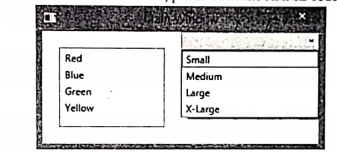
-a) The following WPF based GUI contain a Grid-layout control in which a ListBox and ComboBox are placed in different Column and same Row, please write the XAML code for it.
Marks (06)
Question No. 3
a) Briefly describe Language-Integrated Query (LINQ) and its architecture in Microsoft .NET
Marks (14)
Framework.
b) What are types of LINQ? Explain LINQ to Objects and complete query operation in C# code example for LINQ to SQLObject.
Question No. 4
a) What is the MVC Pattern? Briefly explain the MVC Pattern in ASP.NET MVC and its features, b) What is Entity Framework? Briefly describe ADO.NET Entity Framework (EF) with reference to ADO.NET Entity Data Model.
Visual programming Final paper in 2019
- Can multiple catch blocks be executed? If yes give example if no give reason why? [3]
- Difference between for loop and foreach loop with real life [3]
- Explain dynamic array with real life example [4]
- Write C# code for the given scenario: Consider a class named Person having name (of type string) as instance Student class is a derived class of Person class having following instance variables:
- regNo (of type string)
- age (of type int)
- program (of type Department enumerator)
All these classes contain no-argument and multi-argument constructors to initialize
instance variables. No-argument constructor initializes instance variables with default value (null in case of string and 0 in case of int). Each instance variable has a public property which gets and sets the value of instance variables. [10]
- Write C# code for the given scenario: [10]